

Time:2025.12.03Browse:1
I. Core Working Principle
Basics of Thermal Printing: Uses a print head to heat the coating on thermal paper to generate text/barcodes, no ink consumables required. It is suitable for high-frequency receipt printing scenarios in catering, with a response speed more than 3 times faster than dot-matrix printers.
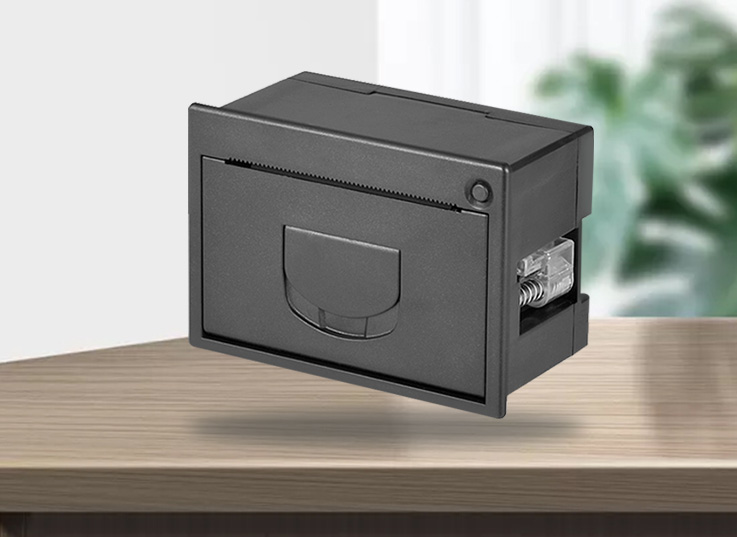
Front Panel Design Logic: The printer is integrated into the front or side of the self-order kiosk. Paper replacement does not require disassembling the device; flip-top or pull-out structures enable "visual operation", meeting the need for quick maintenance during peak catering hours.
Easy Paper Loading Technology Implementation: Through elastic brackets, automatic paper positioning sensors, and paper shortage detection, it achieves three-step paper replacement ("open cover - load paper - close cover"), which even beginners can complete in 10 seconds.
II. Key Features (Catering Scenario-Adapted Version)
1. Core Design for Easy Paper Loading
Structure Types:
Flip-Top Type: e.g., Sewoo Kiosk Printer. The front panel pops open with one click; the paper roll is directly placed into the elastic bracket, and it aligns automatically when the cover is closed.
Pull-Out Type: A hidden paper tray drawer with limit clips to prevent paper roll deviation.
Auxiliary Functions:
Automatic Positioning: Automatically calibrates the paper position when the cover is opened/closed to avoid printing deviation.
Paper Shortage Alert: Notifies via indicator lights/system pop-ups to prepare paper in advance and reduce downtime.
2. Printing Performance Parameters
Speed and Precision:
Printing speed ≥ 100mm/s (e.g., Honeywell OD286D reaches 100mm/s, Sewoo up to 200mm/s), suitable for printing needs of 150 orders/hour during lunch rush.
Resolution of 203DPI, enabling clear printing of QR codes (for order verification), dish barcodes, and amount information.
Paper Tray and Consumables:
Paper tray capacity supports paper rolls with φ80-120mm (Sewoo supports a maximum of φ120mm), reducing paper replacement frequency.
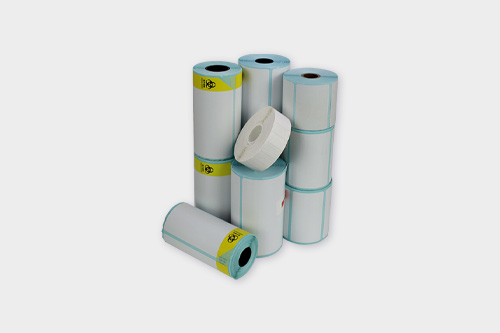
Compatible with 58mm/80mm wide thermal paper (58mm for compact models, 80mm for printing detailed dish information).
3. Durability and Environmental Adaptability
Hardware Lifespan: Cutter life ≥ 1 million cuts (Sewoo), print head life ≥ 200km, meeting the 3+ year service life requirement for catering equipment.
Environmental Resistance: Operating temperature 5-55℃, humidity 10%-90%, suitable for high-temperature and high-humidity environments near kitchens; some models support oil-resistant shell coating.
4. Connectivity and Compatibility
Interface Support: USB 2.0 and RS232C are mainstream; some models offer optional Bluetooth/Ethernet, compatible with Windows/Android self-order kiosk systems.
Command Compatibility: Supports the standard ESC/POS command set, enabling quick connection to mainstream ordering systems.
III. Recommended Popular Products
Sewoo Kiosk Printer (First Choice for Embedded Use)
Core Highlights: Front panel quick paper replacement design, 200mm/s high-speed printing, φ120mm large-capacity paper tray, metal components for enhanced durability, supports both horizontal/vertical installation to adapt to different kiosk structures.
Suitable Scenarios: Embedded self-order kiosks in chain catering, scenarios requiring high-frequency printing with limited space.
Key Parameters: Printing width 72mm, cutter life 1 million cuts, supports half-cut/full-cut switching.
Honeywell OD286D (Multi-Functional Type)
Core Highlights: Patented easy paper loading structure + automatic paper recognition, supports printing of 25 barcode types/2 QR code types (including QR codes for order verification), USB + Bluetooth dual connectivity for mobile debugging needs.
Suitable Scenarios: Mid-to-high-end self-order kiosks that need to print membership codes and coupons.
Key Parameters: Dimensions 158×118×120mm, paper tray φ80mm, operating temperature 0-40℃.
Ninestar 58mm Thermal Printer (Cost-Effective Option)
Core Highlights: Front flip-top paper tray, supports multi-interface (USB/serial port/Ethernet), compatible with mainstream ordering systems, CCC certification for compliance.
Suitable Scenarios: Single self-order kiosks in small and medium-sized catering businesses, with limited budget and basic printing needs.
Key Parameters: Printing speed 90mm/s, paper tray φ70mm, weight only 570g.
IV. Purchasing and Usage Notes
1. Selection Basis
By Installation Method: Choose Sewoo for embedded use (compact size, supports vertical installation); choose Honeywell for desktop use (independent placement, easy maintenance).
By Peak Order Volume: For lunch rush peak ≥ 100 orders/hour, select models with 200mm/s speed (Sewoo); for ≤ 80 orders/hour, optional 100mm/s models (Honeywell).
By Functional Needs: Choose OD286D if QR code printing is required; choose Ninestar 58mm model for pure receipt printing.
2. Operation and Maintenance Tips
Paper Replacement Standards: After opening the front panel, first confirm the orientation of the thermal paper coating (glossy side outward); gently pull the paper end to ensure no jamming before closing the cover.
Regular Cleaning: Wipe the print head with alcohol pads weekly (operate with power off) to remove oil stains and avoid blurred printing.
Consumable Adaptation: Use thermal paper of ≥80gsm (low-grammage paper is prone to jamming); avoid storing paper in high-temperature environments (prone to failure).
3. Pitfall Avoidance Tips
Beware of "Fake Easy Paper Loading": Some models only have a front panel design in appearance but actually require manual paper alignment. Test the paper replacement process on-site during purchase.
Confirm Compatibility: Inform the manufacturer of the self-order kiosk brand and system version in advance to avoid driver adaptation issues.
Don’t Neglect After-Sales Service: Prioritize brands with local service centers to ensure 48-hour repair for print head failures.
Read recommendations:





Building C, Bairongda, Ma'anshan, Bao'an District, Shenzhen City, Guangdong Province
Tel:18823301751
Service Hotline:400-008-8930















 2025-08-15